Why Desk Time Feels Tough On Your Neck And Back
Sitting for long periods is not automatically harmful, but the way many people position themselves at a desk can strain the body. Leaning toward a screen, letting the head drift forward, and rounding the upper back all change how gravity loads the spine and surrounding muscles.
The head is relatively heavy and is designed to sit with the ears roughly in line with the shoulders. When it slides in front of that line, the muscles along the back of the neck and upper spine have to work harder just to keep the eyes facing forward. Over long stretches, those tissues can feel tight, tired, and sore, and some people notice stiffness or headaches.
Staying very still encourages some muscles to shorten while others switch off. Hip flexors can tighten, the front of the chest may feel closed, and the upper back muscles that support a more upright posture may become less active. Over time, the slumped position can start to feel “normal,” which makes it harder to notice and adjust.
Desktop and laptop setups can add to the problem. When a monitor, keyboard, or handheld device sits too low or too far away, many people crane the neck forward and round the upper back to see better or reach the keys. Holding one viewing distance for most of the day also limits eye and neck movement.
Short bouts of gentle movement help interrupt this pattern. Stretching and mobility exercises can reset head and shoulder position and remind joints to move in more than one direction. The key is choosing options that are comfortable and realistic to repeat during a busy day.
A Brief Standing Warm‑Up To Shake Off Desk Slump
A warm‑up between tasks does not need to feel like a workout. Think of it as a small reset that takes only a couple of minutes. Light movement helps increase circulation, open the front of the body, and counter the rounded “desk hunch” many people slide into during focused work.
Stand beside your chair with your feet about hip‑width apart. Let your arms hang, soften your knees, and take a few slow breaths. As you inhale, imagine gently lengthening through the crown of your head. As you exhale, allow your shoulders to drop away from your ears.
Roll your shoulders in slow circles: a set of backward circles, then a set forward. Move comfortably rather than forcing the range. Next, reach both arms overhead, interlace your fingers, and gently press your palms toward the ceiling. Hold for several breaths, then lean slightly to each side.
Lower your arms and place your hands on your hips. Step one foot back into a small, comfortable lunge with the front knee soft. You may feel a mild stretch in the front of the hip of the back leg. Hold briefly, then switch legs.
Finish with an upper‑back movement. Extend your arms forward at shoulder height with the palms together. As you inhale, open your arms wide and imagine the shoulder blades moving toward each other. As you exhale, bring the arms back together. Repeat several times, then return to your chair.
When To Use A Standing Reset
This quick standing sequence fits well into natural pauses during the day.
| Situation cue | How the standing sequence can help |
|---|---|
| After a long writing or coding block | Loosens shoulders and hips that have been still for a while |
| Before a meeting or call | Refreshes focus by changing position and breathing more deeply |
| After sitting through a virtual event | Helps counter rounded posture and stiffness around the upper back |
Choosing one or two moments when you already tend to stand up makes it easier to repeat this warm‑up without feeling like an extra task.
Chair‑Friendly Moves For Busy Work Sessions
A Small Reset Without Leaving Your Seat
On days packed with calls, messages, and deadlines, even standing up can feel difficult to fit in. Chair‑friendly stretches offer a practical middle ground: you stay next to your screen but give your muscles a brief change of position.
A stable, comfortable chair is enough. Sit toward the front of the seat and place both feet flat on the floor. Keep the movements slow and within a comfortable range. A mild feeling of stretch is expected, but anything sharp, intense, or increasing is a reason to ease out of the movement.
Begin with a chin tuck. Sit tall, look straight ahead, and gently draw your chin straight back as if creating a small “double chin,” keeping your eyes level. Hold for a few breaths, then release. This can help counter the forward‑head position that often appears while reading or typing.
Next, explore a side neck stretch. Let one ear tip toward the shoulder on the same side. If it feels comfortable, rest the hand on top of your head without pulling, simply adding a little weight. Breathe slowly, then repeat on the other side.
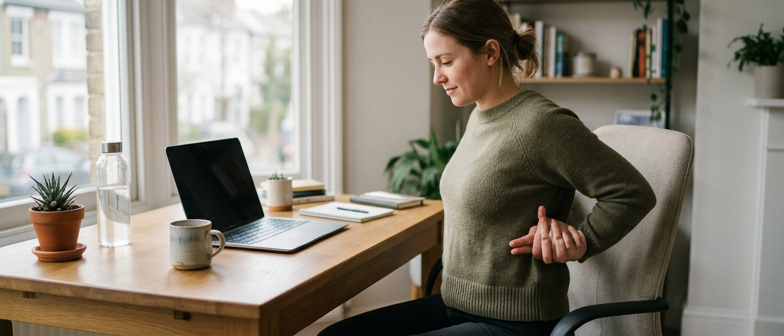
For the upper back and chest, place your hands lightly behind your head or on the upper part of the chair back. Lift your chest slightly and imagine your upper spine extending forward. Avoid dropping the head far back; the idea is to open the front of the chest, not to push into a big backbend.
Finish with a gentle seated twist. Keep both feet grounded, turn your torso toward one side, and rest your hands on the armrest, seat, or thigh for support. Inhale to sit a little taller, then exhale and rotate only as far as feels easy. Come back to center and repeat to the other side.
Matching Chair Stretches To Common Complaints
Selecting movements based on what you notice in your own body can make short breaks feel more targeted.
| Main area of tension | Chair move to prioritize | Why this may feel helpful |
|---|---|---|
| Back of the neck | Chin tuck | Encourages a more neutral head position after forward leaning |
| Side of neck and top of shoulder | Ear‑to‑shoulder stretch | Gently lengthens muscles that often grip while mousing or typing |
| Chest and front of shoulders | Seated chest‑opening movement | Counters rounded shoulders and a closed upper body |
| Mid‑back stiffness | Seated twist | Adds gentle rotation to joints that have been held still |
Rotating through these options over the day can bring more comfort and awareness to long periods of screen time.
Turning Occasional Breaks Into A Simple Daily Habit
Keeping The Sequence Deliberately Small
A tiny, reliable sequence often works better than an ambitious plan that never quite fits into the day. Instead of waiting for a perfect moment to do a long stretching session, shrink your plan down to a mini flow that takes only a few minutes and can be done right in your chair.
One example pattern includes three moves:
- Sit tall with your feet on the floor and slowly reach both arms overhead, feeling length along the sides of your body for several deep breaths.
- Rotate your torso gently to one side, resting your hands on your chair or thigh for support. Then turn to the other side.
- Interlace your fingers behind your back or at the edge of the chair seat, draw your shoulder blades slightly toward each other, and open the chest.
Each movement is low‑intensity and should stay within a comfortable range. The intention is to reduce stiffness through the neck, upper back, and shoulders.
Making Movement Breaks More Automatic
Regular, light movement throughout the day can often feel more sustainable than occasional intense sessions. Building cues into your existing schedule makes it easier to remember short breaks without relying on willpower alone.
You could link one mini routine to finishing a batch of emails. Once you hit send on the last message, pause for a minute to do your three moves before opening a new task. Another option is to use the transition at the end of a meeting: instead of immediately opening another window, stay seated and complete a quick stretch sequence.
If you already get up for a drink refill or restroom break, you might pair that with a brief standing stretch such as a gentle forward fold or a light stretch for the backs of the legs at your desk. Keeping the order of your chosen movements the same each time helps them become more automatic.
Pay attention to how your body responds over several days. If any movement causes pain, dizziness, or unusual discomfort, ease out of it. If needed, consider speaking with a health professional to check which options are appropriate for your situation. Over time, these small, planned pauses can become a natural part of how you organize your desk day, supporting comfort and focus without demanding major schedule changes.
Q&A
-
How can I build a simple Desk Stretch Break Routine that I will actually follow every day?
Start by choosing one standing and one seated stretch you enjoy and pair them with fixed cues like “after coffee” or “before my first call.” Keep each break under three minutes, use a recurring calendar alert, and track completion for one week so the routine feels rewarding instead of disruptive. -
What Office Posture Improvement Tips matter most if I sit at a computer all day?
Prioritize neutral alignment: feet flat, hips slightly higher than knees, screen at eye level, and keyboard close enough to avoid reaching. Combine this with frequent micro‑adjustments, such as shifting weight or gently re‑stacking head over shoulders, rather than trying to “freeze” in one perfect posture for hours. -
Which Desk Stretch Break Routine offers the best Neck And Shoulder Relief during tight deadlines?
A fast, targeted sequence is chin tucks, shoulder rolls, and a gentle ear‑to‑shoulder stretch on both sides. Perform each for twenty to thirty seconds while breathing slowly. This combination unloads the front‑of‑neck strain, reactivates upper‑back muscles, and interrupts the forward‑head pattern created by intense screen focus. -
How can I turn Midday Movement Habits into a Work From Home Wellness anchor?
Use midday as a non‑negotiable “movement checkpoint.” Step away from your workstation, walk a few minutes, then complete a gentle mobility exercise plan for hips, spine, and shoulders. Treat it like a standing meeting with yourself; protect the time in your calendar and avoid scheduling calls across that window. -
What Sitting Break Reminder Ideas work if I ignore normal timers and notifications?
Leverage environmental and behavioral triggers instead of only apps. Place a water bottle across the room so refills require standing, use a smaller coffee mug, or set sticky notes on your monitor with a one‑line stretch cue. You can also schedule walking phone calls so conversations automatically break up long sitting blocks.